

The anatomy of good Business IT
Every business is different, and can utilise IT systems in different ways in order to make themselves more profitable; from simple email communication & file storage, to complicated accounting, design, or manufacturing systems.
However we believe that there are things that every business should have in place as a bare minimum. A technological foundation on which they can build their business-specific IT systems. So many businesses are unintentionally doing IT badly and it is usually down to a lack of understanding, so we have put together a list of basic points which every small business should follow in order to build a good IT foundation.
-
- Domain Name
Running your business using a free email providers domain, such as @hotmail.com, @gmail.com or @btinternet.com does not look as professional as it would if you had your own.
For a small annual fee you can register a domain name better suited to your business such as myownbusiness.com.
This would look much more professional on your vans, business cards or other literature or advertising and would allow you to have email addresses such as sales@myownbusiness.com or info@myownbusiness.com.
- Domain Name

-
- Email
The free email addresses you get when you register your domain are really not designed for businesses in 2015. They rarely have any built in spam filtering, or any backup. They don’t synchronise properly between your PC, your phone and your tablet; and these days most of us work from more than 1 device.
Services like Microsoft’s Office 365 will provide you with a professional email service with spam filtering and automatic back-up from just £3.10/month. It will fully synchronise your emails, contacts and calendars across multiple devices, and there are several different packages offering a selection of services to suit your own needs.
- Email

-
- Business Internet Package
The business packages offered by most internet providers are often a bit more expensive than the equivalent home packages. Don’t be tempted to go for a home package though.
Look carefully at your internet package and make sure that you have at least 1 static IP address (useful if you want to remotely connect to your office or run your own email server in the office). Look at the response times you get as part of your package, and remember that the business support desk is very often much better and more responsive than the home support desk, even though most ISPs would have you believe otherwise! Consider an unlimited download package to help prevent bills for extra data usage.
- Business Internet Package
-
- Router and Wireless Access Points
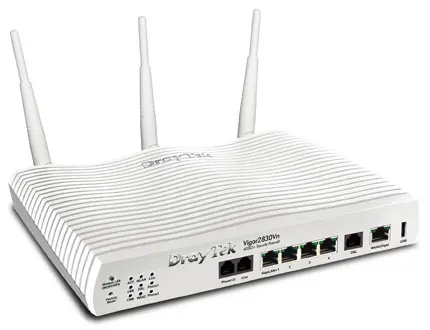
Invest in a business grade firewall. The free routers that come with most internet packages are not designed with security in mind, and are very often built down to a tight budget. Remember that your firewall is the main line of defence between your business network and the outside world.True business grade firewall routers will have security designed into them, the manufacturers have budget for testing and regularly update firmware to fix bugs and patch newly discovered security holes. For most small businesses Draytek firewall routers are more than sufficient. For more advanced applications, high user numbers, high traffic or specific security needs there are more complex firewalls and UTM devices available.
- Router and Wireless Access Points

-
- Network Switch
As a rule, a small business should only have a single Gigabit switch(larger business may need multiple switches but this strays out of the realms of this article). Each device should plug straight into the main switch. If you run out of ports you need a bigger switch. If you don’t have enough cables in your office, you need to run more cables. Plugging 5 PCs in a side-room into a little switch, then running 1 cable back to the main switch is poor practise as those 5 PCs are sharing single cable back to the main switch. This should be avoided as it will cause performance problems unless your network has been specifically designed to operate in this way.
- Network Switch

-
- PCs
We always advise that you use a well-known brand of computers with good support such as HP, Dell or Toshiba. Make sure that your PCs are running a business edition of Windows such as Professional or Enterprise.Aim to replace your PCs on a rolling 3 year cycle and make sure they are covered by a manufacturer warranty at all times. By doing this you will help keep your computers fast and reliable, and reduce your downtime and costs if a PC does fail.
- PCs
-
- Data Storage and Backup
When you share data between users in a business, the data should be stored centrally on a server of some kind. This will allow you to control who is allowed to access the data, it will help prevent multiple versions of the same file being accidentally used, and it will help you to back up all of your data confident that nothing has been missed.This central data store should have a pair of mirrored hard drives (known as RAID1) to protect the data in case of a hard drive failure. Your data should also be backed up offsite to protect it from fire, flooding or theft. By using a multi-layered data backup strategy you are not only protecting yourself from data loss, you are also minimising the amount of time wasted recovering data.
- Data Storage and Backup

-
- Antivirus (or Endpoint Security)If you are running a business you should be subscribed to a reputable endpoint security package. This should include:-
- Traditional antivirus
- Advanced threat protection
- Web security
- Application control
- Device control
- Malicious traffic detection
All of these elements work together to stop your network becoming infected, stop the infections damaging your computers or your files, and stop business data being stolen.
The software should include a central console either on a server or in the cloud, this will allow you to make sure all of your PCs are up to date and protected without having to go round and look at them all one by one. It will also send you email alerts if any of your PCs gets a virus – useful!
We recommend Sophos Endpoint Protection as our security package of choice, but the take home message here is to research the package you intend to buy and make sure that it ticks all of the boxes.
- Antivirus (or Endpoint Security)If you are running a business you should be subscribed to a reputable endpoint security package. This should include:-
Support
Gone are the days when IT support just fixed computers when the broke. These days it is about keeping your computers running quickly, and securely; reducing downtime and improving productivity.
Your IT support partner should be monitoring critical functions like backup, antivirus, and your business software. They should be proactively patching your software to fix bugs and improve security. They should keep accurate records of your network, your hardware and software, your settings and all of your services. They should response quickly to requests and back this up with a guaranteed response SLA.
All work should be logged in order to spot patterns and trends and help suggest ways you can improve your systems to help your business work better.
In short your IT support partners should truly understand business IT, truly understand your business, and proactively help you to make technology work harder for your business.