
Following on from our previous tips last week on how to keep your iPhone uncluttered and working as quick as possible. This week we’ll look at some of the lesser known features introduced in iOS 8.
- Find my iPhone has had an upgrade.The idea behind Apple’s ‘Find my Phone’ service has quite possibly put a lot of worried minds at ease. However there is still a catch to Find my Phone, your phone has to be on. Which in short means no battery, no good. That is until now The latest update to iOS 8 has now added the ability for your device (iPhone, iPad and iPod) to broadcast their last know location just before they switch off.
To enable this, simply:
- Open Settings
- Tap iCloud > Find my [fusion_builder_container hundred_percent=”yes” overflow=”visible”][fusion_builder_row][fusion_builder_column type=”1_1″ background_position=”left top” background_color=”” border_size=”” border_color=”” border_style=”solid” spacing=”yes” background_image=”” background_repeat=”no-repeat” padding=”” margin_top=”0px” margin_bottom=”0px” class=”” id=”” animation_type=”” animation_speed=”0.3″ animation_direction=”left” hide_on_mobile=”no” center_content=”no” min_height=”none”][device]
- Switch on ‘Send Last Location’.
One thing to remember is that this will only work if your device has a connection to the internet.
- No more typing long card numbersIf you have a tendency to make a lot of purchases on your phone, or you’re buying in a hurry and don’t have time to write out your credit card number, then don’t fret. Another new feature in iOS 8 is that Safari now has the ability to scan these details in for you.
- No more risk of personal photos appearing at the wrong time.If you have the same phone for personal-you and professional-you, the last thing you want is for photos of your last family holiday appearing in the middle of you showcasing your products. Luckily it would seem that Apple have considered this and add the ability to hide photos in your photo album. All you have to do is hold your finger on a photo and then select ‘Hide’ in the menu that appears.
- Apps proving to be an unnecessary drain?iOS 8 now includes a handy screen which can help you spot any app that may be an unhealthy drain on your battery. Once found you can then decide if you need to remove it or if you need to maybe find an alternative.
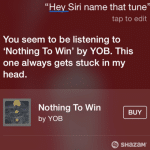
- The restThere have also been a number of smaller updates added in such as the ability to reply to messages by pulling down their notification. A better selection of options when swiping right n the mail app. The ability change your display settings to greyscale and Siri has been given a musical boost, integrated now with Shazam the popular song identifying app. If you hear a song you like but don’t know, simply ask Siri who will then hunt through the database to tell you what the song is and even provide a link for you to buy it on the same screen.
[/fusion_builder_column][/fusion_builder_row][/fusion_builder_container]