
Windows Server 2003
Windows Server 2003 is one of the most popular Microsoft products in Small Business and Enterprise alike. This summer it is due to go “End of Life”. This means higher risk, lower security, and failure to meet the required standards for many industry certification bodies. So what should you be doing about it?
‘We offer Microsoft Service 2003 migration services in the Essex, Hertfordshire and London area; for a free consultation on your migration call First Stop IT now on: 0845 458 0553’.
Many of the services which we take for granted in our businesses are reliant on a secure and stable server platform, and the end of support for Windows Server 2003 is threatening to cause problems for many businesses.
File storage and sharing, print services, corporate instant messaging, emails, CRM, ERP, design, accounting, manufacturing, helpdesk services, and many more business applications are all running on Windows Server 2003 in businesses; and these businesses need to find an alternative platform, and so do quickly.
When this produce goes End of Life on 14th July 2015 there will be no more patches, no more security updates and no more technical support from Microsoft. Those who fail to act in time will be left increasingly vulnerable to data breaches, without Microsoft support for their server software, and potentially facing major problems.
So what should you be doing about it?
Plan, Plan, Plan – Moving essential services from one platform to another can be time consuming and disruptive, especially if it is rushed, or not planned properly. To plan and implement the move properly from Windows Server 2003, businesses should be acting now.
Arrange by criticality, and vulnerability – Review your network and understand which services are running on Windows Server 2003, sort them by how critical they are to your business, and how vulnerable they might be. Assess the risk to your business and prioritise the migration of the data and services accordingly.
Decide where to put the services – Once you have decided which services need to move, and which order you are going to move them in. The next step is to decide where to put them.
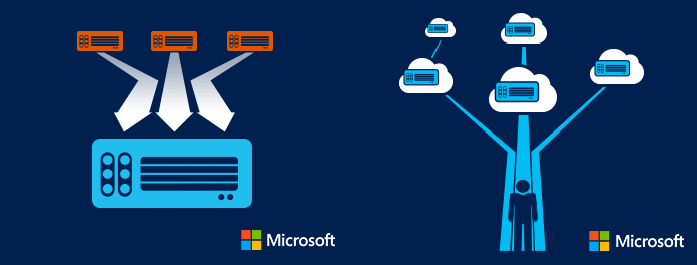
You could replace your old servers with new ones running Microsoft Windows Server 2012R2. This has the advantages of being a familiar operating environment, running internally with little to no changes to your existing architecture. However it may not be the most appropriate solution for your business.
Since Windows Server 2003 was released cloud services have improved vastly, and the flexibility, scalability, and cost effectiveness of many modern cloud solutions make it worth reviewing each service in turn in order and making informed decisions about where it is best to place them.
How can we help?
If you are facing these decisions, and would like one of our friendly, experienced and certified consultants to help, please call us now on 0845 458 0553 to arrange your free initial consultation.