

Ransomware the threat to your business
Picture this: You’ve spent the last few weeks working on a big proposal to land a new client.
You’ve spend painstaking hours collecting information and putting it together, designing your PowerPoint presentation and hand outs. Thousands of pounds in man hours has gone into this job.
When you finally finish the project, you go to copy the file onto a USB stick and—what the?—a strange message pops up.
“The files on this computer have been encrypted. You have 96 hours to submit payment, otherwise your files will be permanently destroyed.”
You’ve been hit with ransomware.
But it’s OK because you have a backup right? You discover your recent backup has been deleted! In fact, ALL of your backups have been deleted. What do you do?
These attacks are getting more and more aggressive and targeting a wide range of backup systems so that you CANNOT recover without paying.
Unfortunately, when it comes to ransomware, once your files are encrypted, there’s not much you can do—besides cut your losses or pay up. And even if you do pay up, there’s a chance you won’t get your files back, so you’re out the files and your cash.
The recent outbreak of WanaCry was the largest ransomware attack in the history of the Internet, freezing hospital workers out of critical data and disrupting operations of organisations in 150 countries.
These types of attacks can have a devastating impact, from losing precious personal and company data to shutting down hospital services in the middle of emergency procedures. In some cases, it’s a matter of life or death.
That’s why it’s so important to prevent ransomware attacks from hitting in the first place.
WannaCry was just one of the major attacks this year so far.
Jigsaw, Cryptomix, Cerber, Spora, Jaff, Nemucod, CrySis, Locky, WannaCry and NotPetya are just the top 10 of 2017.
Types of ransomware
The first step in ransomware prevention is to recognise the different types of ransomware you can be hit with. Ransomware can range in seriousness from mildly off-putting to Cuban Missile Crisis severe.
Scareware
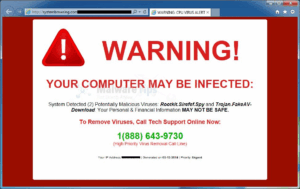 Okay, yes, it’s called scareware, but in comparison to other types of ransomware—not so scary. Scareware includes rogue security software and tech support scams. You might receive a pop-up message claiming that a lot of malware were discovered and the only way to get rid of them is to pay up. If you do nothing, you’ll likely continue to be bombarded with pop-ups, but your files are essentially safe. A quick scan from your security software should be able to clear out these suckers.
Pro tip: A legitimate cybersecurity software program would not solicit customers in this way. If you don’t already have this company’s software on your computer, then they would not be monitoring you for ransomware infection. If you do have this company’s software, you wouldn’t need to pay to have the infection removed—you’ve already paid for the software to do that very job.
Screen lockers
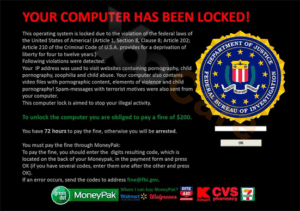 Upgrade to terror alert orange for these guys. When lock-screen ransomware gets on your computer, it means you’re frozen out of your PC entirely. Upon starting up your computer, a full-size window will appear, often accompanied by an official-looking FBI or U.S. Department of Justice seal saying illegal activity has been detected on your computer and you must pay a fine.
In order to reclaim control of your PC, a full system restore might be in order. If that doesn’t work, you can try running a scan from a bootable CD or USB drive.
Pro tip: Law enforcement agencies would not freeze you out of your computer or demand payment for illegal activity. If they suspected you of piracy, child pornography, or other cybercrimes, they would go through the appropriate legal channels.
Encrypting ransomware
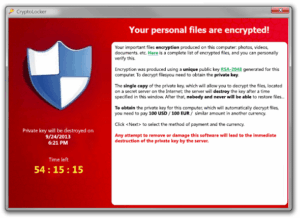 This is the truly nasty stuff. These are the guys who snatch up your files and encrypt them, demanding payment in order to decrypt and redeliver. The reason why this type of ransomware is so dangerous is because once cyber criminals get hold of your files, no security software or system restore can return them to you. Unless you pay the ransom—they’re gone. And even if you do pay up, there’s no guarantee the cyber criminals will give you those files back.
Pro tip: The NCSC has changed its position on whether you should pay the ransom. They now agree with cybersecurity professionals, who advise you to avoid this option. Complying with ransomware criminals just opens the door up for future attacks. If, however, really valuable files are at stake, you can try to negotiate the release of the most important for less money. This should only be done as a last resort.
So what should you do to protect your files from this kind of ransomware? Get out in front of it.
Ransomware prevention
 The best strategy in ransomware prevention is to invest in effective cyber security — a combination of processes, education, hardware and software to prevent data leakage and hacking, detect if they do happen and recover from the attack. Preventative measures include anti-ransomware, anti-malware and next generation firewalls. You should also look out for features that will both shield vulnerable programs from threats (an anti-exploit technology) as well as block ransomware from holding files hostage.
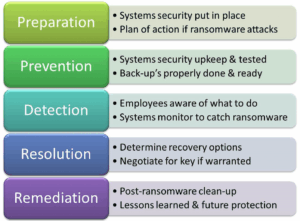
Next you need to create secure backups of your data on a regular basis. Offsite backup is more affordable than ever. Using that along with some network storage means you can protect your company critical data in many ways. There are even disaster recovery services that will allow you to recover from any type of data encryption/loss within minutes.
Then, be sure your systems and software are updated. The most recent ransomware outbreak took advantage of a vulnerability in Microsoft software. While the company had released a patch for the security loophole back in March, many people didn’t install the update—which left them open to attack.
We get that it’s hard to stay on top of an ever-growing list of updates from an ever-growing list of software and applications used in your daily life. That’s why we recommend changing your settings to enable automatic updating.
Finally, stay informed. One of the most common ways that computers are infected with ransomware is through social engineering. Educate yourself on how to detect phishing campaigns, suspicious websites, and other scams. And above all else, exercise common sense. If it seems suspect, it probably is.
Customers who adopted these practises were protected from the WanaCrypt0r attack.